Why there are Amazon links here: Brave Review is paid a commission for qualifying Amazon purchases made through the links below. Your price does not change, and using our links is entirely optional. How this works
Yale Keypad Touch Fingerprint Door Lock: A Keyless Deadbolt That Needs a Brain
The Yale Keypad Touch is the add-on keypad, not the lock. It replaces the standard keypad on a Yale smart deadbolt with one that reads fingerprints and PIN codes, so a homeowner can walk up and open the door without a key or a phone. This review covers what the unit adds to an existing Yale setup, who should buy it, and the one compatibility catch that decides the purchase. Readers who already own a Yale smart lock can check the current price through the link below; readers shopping for their first smart lock should start elsewhere.
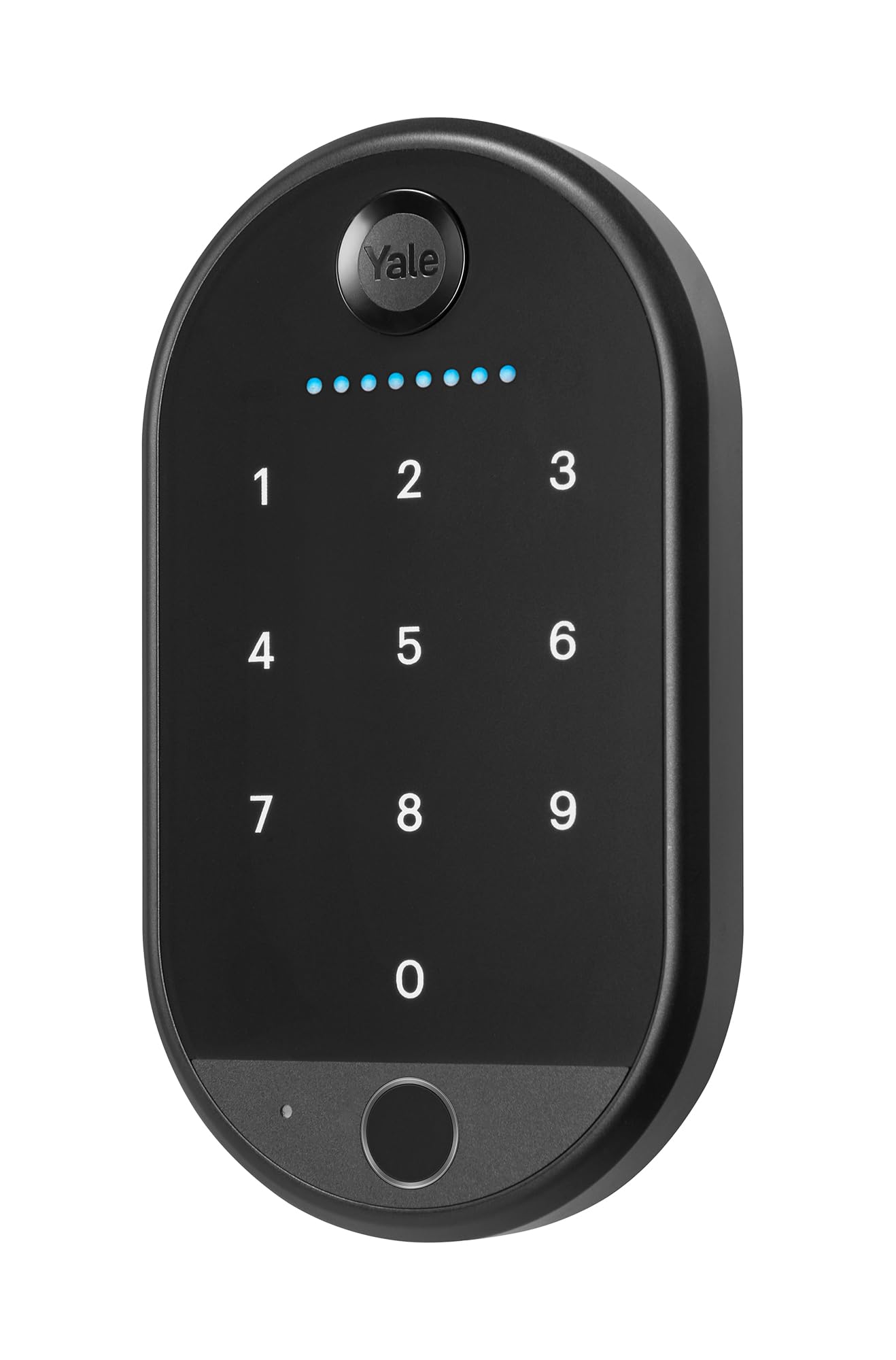
Product: Yale Keypad Touch, Fingerprint Door Lock, Keyless Entry, Smart deadbolt, Pin Code Entry – Does Not Include Required Smart Lock
ASIN: B0D323KSFX
Price Tier: Budget-friendly accessory
Popularity: 50+ bought in the past month
Best For: Owners of a compatible Yale smart lock who want fingerprint or PIN entry
Check the current price on Amazon
Features and Specifications
- Product Type: Keypad touch module for a smart deadbolt
- Entry Methods: Fingerprint recognition, PIN code entry, keyless entry
- Compatibility: Requires a Yale smart lock (not included)
- Intended Use: Residential exterior doors with an existing Yale deadbolt
- Installation: Replaces the factory keypad on a compatible lock
- Price Tier: Accessory-level, well below the cost of a full lock
The name tells the buyer almost everything that matters. This is a touch keypad with a fingerprint reader and a PIN pad, built to swap onto a Yale smart deadbolt. The phrase "Does Not Include Required Smart Lock" is the single most important line in the listing, and it is the line most shoppers skim past.
The unit is not a standalone lock. It has no deadbolt, no motor, and no radio of its own — those live in the smart lock body it attaches to. What the keypad contributes is the interface: a surface that reads a fingerprint or accepts a code and hands that credential to the lock underneath.
That division of labor is why the price sits where it does. A full smart deadbolt is a substantial purchase; a keypad module is an upgrade part. Buyers who already own the lock get the new entry method for far less than replacing the whole assembly, and buyers who do not own the lock should not be shopping here at all.
Build and Design
The keypad is a slim, surface-mounted panel designed to sit flush against the exterior trim of a door. It is the visible half of the lock, so Yale builds it to look like hardware rather than a gadget — a flat face, a touch surface, and a fingerprint sensor positioned where a thumb naturally lands.
Because it replaces the factory keypad rather than adding a second device, the finished install looks factory. There is no piggybacked box screwed to the doorframe. For buyers who care about curb appeal, that matters more than any spec sheet.
The trade-off here is that the design is fixed to the lock it serves. The keypad cannot be moved to a different brand, and a buyer who later swaps lock systems loses the module with it. This is a part, not a platform.
Fingerprint and PIN Entry
The fingerprint reader is the headline feature, and it changes the daily routine more than the PIN pad does. A finger on the sensor opens the door in one motion — no code to remember, no phone to dig out, no key to fish from a pocket.
PIN entry covers everyone the fingerprint does not. Guests, a dog walker, a contractor, or a family member whose fingerprint will not enroll cleanly can all be given a code instead. The two methods together mean the lock is usable by anyone the owner chooses to admit, without handing out physical keys.
The caution is familiar to anyone who has used a fingerprint reader in cold or wet weather. Fingers that are damp, dirty, or extremely dry can fail to read, and the fallback is the PIN pad. That is a minor friction, not a defect, but it is the reason the code entry is not optional.
Power and Smart Lock Integration
The keypad draws its power from the smart lock it is attached to, which keeps the module itself thin and free of a battery hatch. There is nothing to recharge on the keypad side; the lock body remains the thing that needs periodic battery attention.
Integration is where the compatibility requirement bites. The keypad talks to the Yale lock, and the lock talks to the app and to any connected smart home system. Buyers who want remote codes, entry logs, or voice assistant control get those from the lock, not from this panel — the keypad is the input, the lock is the intelligence.
That hierarchy is worth understanding before purchase. A buyer expecting the keypad to add app features to a dumb deadbolt will be disappointed. A buyer adding a fingerprint reader to an already-smart Yale lock gets exactly what the listing promises.
Maintenance and Everyday Use
Day to day, the keypad asks almost nothing. The touch surface wipes clean, the fingerprint sensor benefits from an occasional dry wipe, and there are no batteries to track on this component. The lock body handles its own power and its own alerts.
The realistic maintenance concern is wear on the touch surface over years of use, and the fact that a fingerprint sensor is a mechanical component that can eventually degrade. Neither is unusual for the category, and both are covered by treating the keypad as the replaceable part it is.
For a rental property or a home with high foot traffic, the PIN pad sees the most action and the fingerprint reader the least. For a family home, the reverse is usually true. Either way, the module is simple enough that maintenance is a wipe and a glance, not a routine.
Trade-off: The keypad is useless without a compatible Yale smart lock, so buyers who do not already own one are paying for a part they cannot install.
Who It Suits and Who It Does Not
This keypad suits the homeowner who already has a Yale smart deadbolt and wants to stop carrying a key. It also suits the household that wants to give a cleaner or a sitter a code without cutting a physical key, and the family that finds phone-based unlocking slower than a thumb.
It does not suit the buyer shopping for a first smart lock. That buyer needs the full assembly, and this listing explicitly excludes it. It also does not suit anyone with a different brand of deadbolt, since the module is built for Yale hardware.
Buyers who want the keypad and the lock together should budget for both. The combined cost is still reasonable for a fingerprint-capable smart deadbolt, but it is a different purchase than the one this listing represents.
FAQ
-
Does the Yale Keypad Touch work on its own?
No. The listing states clearly that the required smart lock is not included. The keypad is a module that attaches to a compatible Yale smart deadbolt and depends on it for power and for the actual locking mechanism. -
What is the difference between this and a full Yale smart lock?
A full smart lock includes the deadbolt, motor, radio, and app connectivity. This product is only the exterior keypad with fingerprint and PIN entry. Buyers who already own the lock are upgrading the interface; buyers who do not are missing the core component. -
Can the keypad store both fingerprints and PIN codes?
Yes. The product name lists fingerprint recognition, PIN code entry, and keyless entry as its methods, so a household can mix and match — fingerprints for residents, codes for guests and service providers. -
Does it need its own batteries?
The keypad is powered through the smart lock it attaches to, so there is no separate battery to manage on the keypad itself. Battery attention stays with the lock body. -
Will it fit an existing Yale smart deadbolt?
It is built to replace the factory keypad on a compatible Yale lock. Buyers should confirm their lock model supports the Keypad Touch before ordering, since the module is not universal across all Yale hardware. -
Can it be used in rain or cold weather?
The keypad is designed as exterior door hardware and is meant to live outdoors. Fingerprint reads can be less reliable when fingers are wet, cold, or very dry, and the PIN pad is the fallback in those conditions. -
Does it work with a smart home system?
Smart home features come from the Yale lock the keypad is attached to, not from the keypad itself. The keypad is the input device; app control, remote access, and integrations live in the lock. -
Is it good for rentals and guest access?
Yes, for hosts who already run a Yale smart lock. Temporary PIN codes are the natural fit for guests and cleaners, and the fingerprint reader serves the owner or long-term residents. -
What happens if the fingerprint reader fails?
PIN entry remains available as the backup method, which is why the code pad is not optional. A buyer should never rely on fingerprint alone as the only way in. -
Is the price worth it compared with replacing the whole lock?
For someone who already owns a compatible Yale lock, the keypad is the cheaper path to fingerprint entry by a wide margin. For someone who does not, the total cost of lock plus keypad is the real number to compare.
Bottom Line
The Yale Keypad Touch is a smart, well-targeted upgrade for one specific buyer: the owner of a compatible Yale smart deadbolt who wants fingerprint and PIN entry without replacing the whole lock. It is compact, it looks factory-installed, and it adds the one feature — a thumb on a sensor — that makes keyless entry actually feel keyless. The catch is absolute: without the required smart lock, the keypad does nothing. Buyers who already have the lock should check the current price on Amazon and confirm compatibility; buyers who do not should put the money toward the full lock first.
