Why there are Amazon links here: Brave Review is paid a commission for qualifying Amazon purchases made through the links below. Your price does not change, and using our links is entirely optional. How this works
Best Smart Lock for a Door With No Handle: 5 Keyless Picks That Fit a Bare Door
A door with no handle is a deadbolt-only door, and the best smart lock for a door with no handle has to replace the bolt itself rather than sit on a lever. The five picks below cover renters, Airbnb hosts, and homeowners who want fingerprint, keypad, or app entry on a bare door. Budget shoppers should look at the Tapo, fingerprint fans at the Wyze, and premium buyers at the Kwikset. The overview table below sorts all five by key spec and price tier.
Overview of the Picks
| Product | Key Spec | Best Use | Price Tier |
|---|---|---|---|
| Fingerprint Smart Door Lock with Handle & Keypad | Fingerprint + keypad + handle | Replacing a whole bare door setup | Budget |
| Tapo Smart Wi-Fi Deadbolt DL100 | Wi-Fi deadbolt, tactile buttons | Simple app-controlled bolt | Budget |
| Wyze Auto-Lock Bolt v2 | Fingerprint scanner, 8 months battery | Fast keyless entry | Mid-range |
| Kwikset Halo Wi-Fi Smart Lock | Geofence auto-unlock, Grade AAA | Premium hands-free entry | Premium |
| Yamiry Fingerprint Knob | Fingerprint knob + remote passcodes | Rentals and shared doors | Budget |
Fingerprint Smart Door Lock with Handle & Keypad

Type: Complete handle-and-lock set
Entry Methods: Fingerprint, keypad, remote access
Smart Home: Alexa and Google compatible
Installation: DIY
Intended Use: Homes, kids, Airbnb, rental property
Fingerprint Smart Door Lock with Handle & Keypad is the odd one out in this roundup because it brings a handle with it. For a genuinely bare door, that is a benefit: the set fills the handle cutout and the bolt position in one purchase instead of leaving a blank faceplate. The fingerprint reader and keypad handle day-to-day entry, and remote access covers letting someone in while away.
The Alexa and Google compatibility makes it a reasonable fit for a household that already runs voice commands. Kids and short-term guests get the keypad, while the fingerprint reader suits anyone who wants to leave the house without keys. It is aimed at the buyer who wants one box to solve the whole door.
Trade-off: A combined handle-and-lock unit has more moving parts than a plain deadbolt, and the finish on a budget set is unlikely to match premium hardware over years of use.
Check the current price on Amazon
Tapo Smart Wi-Fi Deadbolt Door Lock DL100

Type: Wi-Fi deadbolt
Entry Method: Tactile keypad buttons
Weather Rating: IP54
Durability Rating: BHMA Grade 3
App Features: In-app monitoring, auto-lock
Door Fit: Standard door sizes
Tapo Smart Wi-Fi Deadbolt Door Lock is the simplest answer for a bare door: it is a deadbolt, so it drops into the bolt hole and nothing else is needed. Tactile buttons give physical feedback under a finger, which helps in the dark or in rain. The IP54 rating covers outdoor mounting, and BHMA Grade 3 is an entry-level commercial durability grade rather than a decorative claim.
The app adds monitoring and auto-lock, so the door relocks itself after entry without anyone remembering. It is built for standard door sizes, which keeps the install predictable. This is the pick for a buyer who wants basic, reliable keyless entry without paying for a fingerprint reader.
Trade-off: A Grade 3 rating and a budget price point suggest the internals are built to a price, so heavy daily use in a busy household may wear faster than premium hardware.
Check the current price on Amazon
Wyze Auto-Lock Bolt v2

Type: Fingerprint deadbolt
Entry Methods: Fingerprint, keypad, backup keys
Battery Life: 8 months
Durability Rating: BHMA2
Weather Rating: IP53
Keypad Feature: Anti-peep
Wyze Auto-Lock Bolt v2 puts a fingerprint scanner on a deadbolt, which is the fastest entry method for most people. The AI learning scanner is designed to improve recognition with repeated use, and the anti-peep keypad lets a code be entered with extra digits so onlookers cannot read it. Backup keys cover the dead-battery case.
Eight months of battery life means roughly two charges or swaps a year in normal use. BHMA2 sits a step above the entry grade, and IP53 handles outdoor weather. It suits a front door where speed matters and the household does not want to carry keys.
Trade-off: Fingerprint readers can struggle with very dry, wet, or worn fingertips, so a backup code or key stays essential rather than optional.
Check the current price on Amazon
Kwikset Halo Wi-Fi Smart Lock
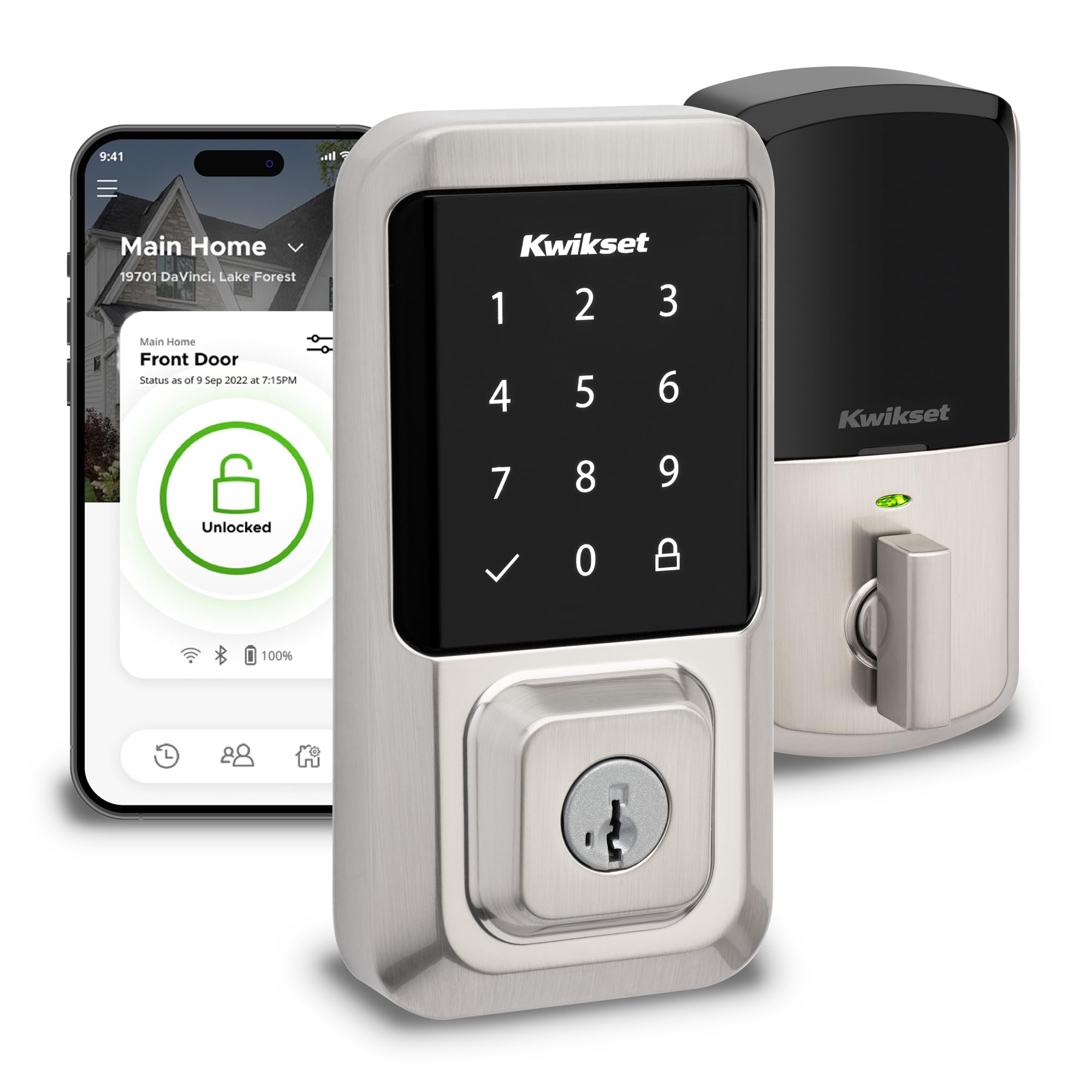
Type: Wi-Fi touchscreen deadbolt
Entry Method: Touchscreen keypad
Auto-Unlock: Geofence
Durability Rating: Grade AAA certified
Finish: Satin nickel, lifetime finish warranty
Hub: Not required
Kwikset Halo Wi-Fi Smart Lock is the premium option, and the spec sheet explains why. Grade AAA is the top residential durability grade, and the satin nickel finish carries a lifetime warranty against tarnish. No hub is required, so the lock talks to Wi-Fi directly and the install stays simple.
Geofence auto-unlock is the standout feature: the door unlocks as the homeowner approaches with a phone. The touchscreen wakes on contact and handles codes for guests and family. It is aimed at buyers who want the door to feel invisible, not at renters who need a cheap bolt.
Trade-off: The premium price buys finish and grade, not extra entry methods, so a buyer who mainly wants fingerprint access pays more for features they will not use.
Check the current price on Amazon
Yamiry Fingerprint Knob

Type: Fingerprint knob lock
Entry Methods: Fingerprint, keypad, remote passcodes
App Features: Remote passcode generation, passage mode
Installation: DIY
Auto-Lock: Yes
Intended Use: Front door
Yamiry Fingerprint Knob is a knob-style lock that combines a keypad with a fingerprint reader. Remote passcode generation through the app is the feature that earns it a place here: a host can issue a code from anywhere without being at the door. Passage mode disables auto-lock for a stretch of time, which helps when moving furniture or hosting a party.
DIY installation and auto-lock round out the package. It fits a front door and suits rentals and shared households where codes change regularly. The knob format is a practical choice for a door that never had hardware fitted.
Trade-off: A knob-style lock puts the fingerprint reader at the height of the knob, which is convenient for adults but awkward for children and taller users, and the budget build is unlikely to match premium hardware.
Check the current price on Amazon
Before You Buy
- Door Type: A bare door needs a deadbolt or a knob-and-bolt set; confirm which hole pattern the door already has before ordering.
- Handle Requirement: Only the Fingerprint Smart Door Lock set includes a handle, so a door with no handle at all needs that pick or a separate handle purchase.
- Compatibility: Check the door thickness and backset against the lock’s stated fit, especially on older or non-standard doors.
- Weather Exposure: An outdoor door needs an IP rating; IP54 and IP53 both cover rain, but an exposed coastal door needs more thought.
- Power: Battery life ranges from months to under a year, so plan for a spare set or a recharge routine.
- Backup Access: Every smart lock should have a key, a code, or both, because electronics fail.
- Rental Rules: Renters should confirm the landlord allows hardware changes before installing anything.
Frequently Asked Questions
-
Can a smart lock go on a door with no handle?
Yes. A deadbolt-only smart lock replaces the bolt and needs no handle, while a combined set adds a handle if the door has a cutout for one. -
Which pick is best for an Airbnb?
The Yamiry knob and the Fingerprint Smart Door Lock set both support remote passcodes, which suits short-term guests who need a fresh code each stay. -
Do these locks need a hub?
The Kwikset Halo and the Tapo connect over Wi-Fi directly, and no hub is required for either. -
What happens when the battery dies?
Backup keys are the safety net on the Wyze, and the other picks should be checked for a key or external power option before purchase. -
Is a fingerprint lock faster than a keypad?
For most adults, yes. A fingerprint reader removes the need to remember or type a code, though wet or worn fingers can slow recognition. -
Can a smart lock be installed without a professional?
All five picks list DIY installation, so a household with basic tools can handle the swap.
Bottom Line
The Wyze Auto-Lock Bolt v2 is the best smart lock for a door with no handle for most buyers: it is a true deadbolt, adds a fingerprint reader for fast entry, and carries a stronger durability grade than the cheapest picks. Buyers who need a handle included should take the Fingerprint Smart Door Lock set, and premium shoppers who want geofence unlocking should step up to the Kwikset Halo.
