Why there are Amazon links here: Brave Review is paid a commission for qualifying Amazon purchases made through the links below. Your price does not change, and using our links is entirely optional. How this works
Best Smart Lock for a Household with a Carer: 5 Picks That Share Access Safely
A household with a carer needs a lock that lets more than one person in without handing out spare keys. The five picks below cover three buyer profiles: families who want remote access for a visiting carer, households that prefer a fingerprint or keypad for someone who cannot manage a key, and budget-conscious setups that still need fob and code entry. The overview table sums up each pick, and every product links to Amazon for live pricing.
The Picks at a Glance
| Product | Key Spec | Best Use | Price Tier |
|---|---|---|---|
| Philips WiFi Keypad Deadbolt with Handle (B0F61WG9F2) | Voice and fingerprint unlock, built-in WiFi | All-round family pick with a physical lever | Mid |
| Philips Wi-Fi Front Lock Set with 2 Handles (B0GK1399SV) | Code, fingerprint and app unlock, two handles | Two-door or front-and-back setup | Upper mid |
| WiFi Video Smart Lock with Handle (B0H9K7SW14) | Live 2-way video talk | Checking in on a carer’s visit | Premium |
| Veise VE06-H Smart Front Door Lock Handle Set (B0CNRLZWSG) | Fob unlock, IP55 waterproof | Carers who prefer a key fob | Budget |
| Philips Upgraded Wi-Fi Smart Lock with Handle (B0GZNFRZ6D) | Fingerprint, app remote control | Bedroom and office doors inside the home | Budget |
1. Philips WiFi Keypad Deadbolt with Handle (B0F61WG9F2)

Type: Keypad deadbolt with lever handle
Unlock Methods: Voice, fingerprint, code, app
Connectivity: Built-in WiFi
Key Feature: Flexible codes and auto-lock
Keypad: Backlit
Price Tier: Mid
This lock combines a deadbolt and a lever handle in one unit, so it replaces the whole entry hardware rather than bolting onto an existing handle. Flexible codes are the feature that matters most here: a carer can be given a code that is easy to change when the arrangement ends. The backlit keypad helps on early-morning or evening visits, and the fingerprint reader gives a second route in for anyone who struggles with a key. Auto-lock means the door secures itself after entry, which is a real advantage when a carer is juggling bags or helping someone through the doorway.
The built-in WiFi keeps setup simple because no separate hub is needed, and app remote control lets family members unlock the door from elsewhere if a carer arrives early. The lever handle suits most standard front doors and gives a familiar push-down action. This is the pick for households that want one device to cover code, fingerprint and remote access without jumping to the highest price.
Who It Suits: Families who want a full handle-and-deadbolt replacement with remote access for a carer.
Trade-off: The all-in-one handle design means the door must match the lever’s fit, and replacing existing hardware is more involved than swapping a bare deadbolt.
2. Philips Wi-Fi Front Lock Set with 2 Handles (B0GK1399SV)
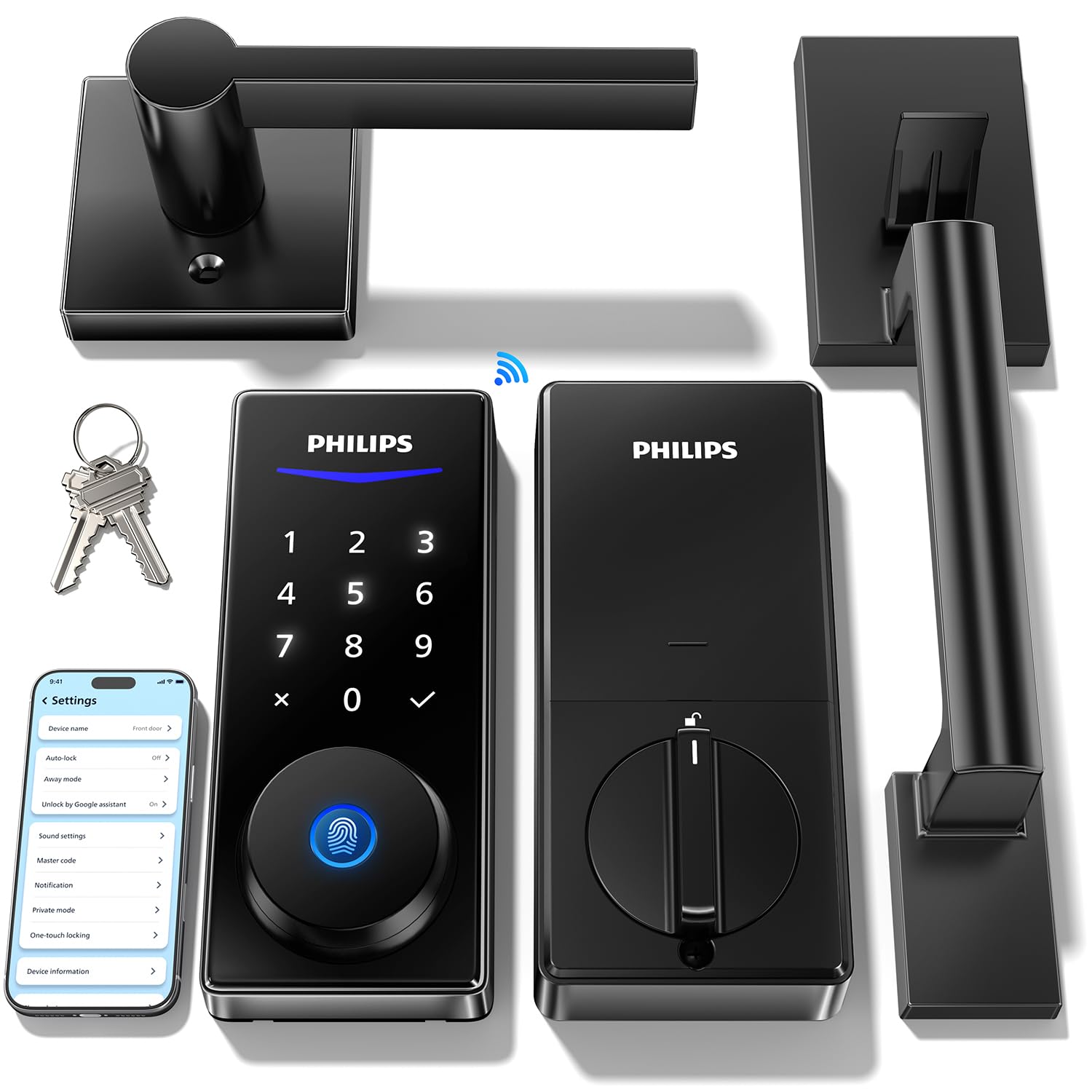
Type: Keypad deadbolt set with 2 handles
Unlock Methods: Code, fingerprint, app
Voice Control: Alexa and Google
Connectivity: Built-in WiFi
Key Feature: Backlit touchscreen and auto-lock
Price Tier: Upper mid
This set ships with two handles, which makes it the practical choice for a home where the carer enters through a side or back door as often as the front. The touchscreen is backlit, so codes can be entered in low light without hunting for buttons. Remote access through the app covers the case where a carer is locked out and a family member needs to open the door from work.
Alexa and Google voice unlock adds a hands-free option, useful when the person being cared for cannot easily reach the lock. The code, fingerprint and app routes give three separate ways in, so a carer can use whichever suits them and a family member keeps oversight. Two handles in one box also means matching hardware on both doors rather than a mismatched look.
Who It Suits: Households with two entry doors that both need smart access for a carer.
Trade-off: The touchscreen is a glass-style surface, so it shows fingerprints and smudges more than a matte keypad and needs occasional wiping.
3. WiFi Video Smart Lock with Handle (B0H9K7SW14)
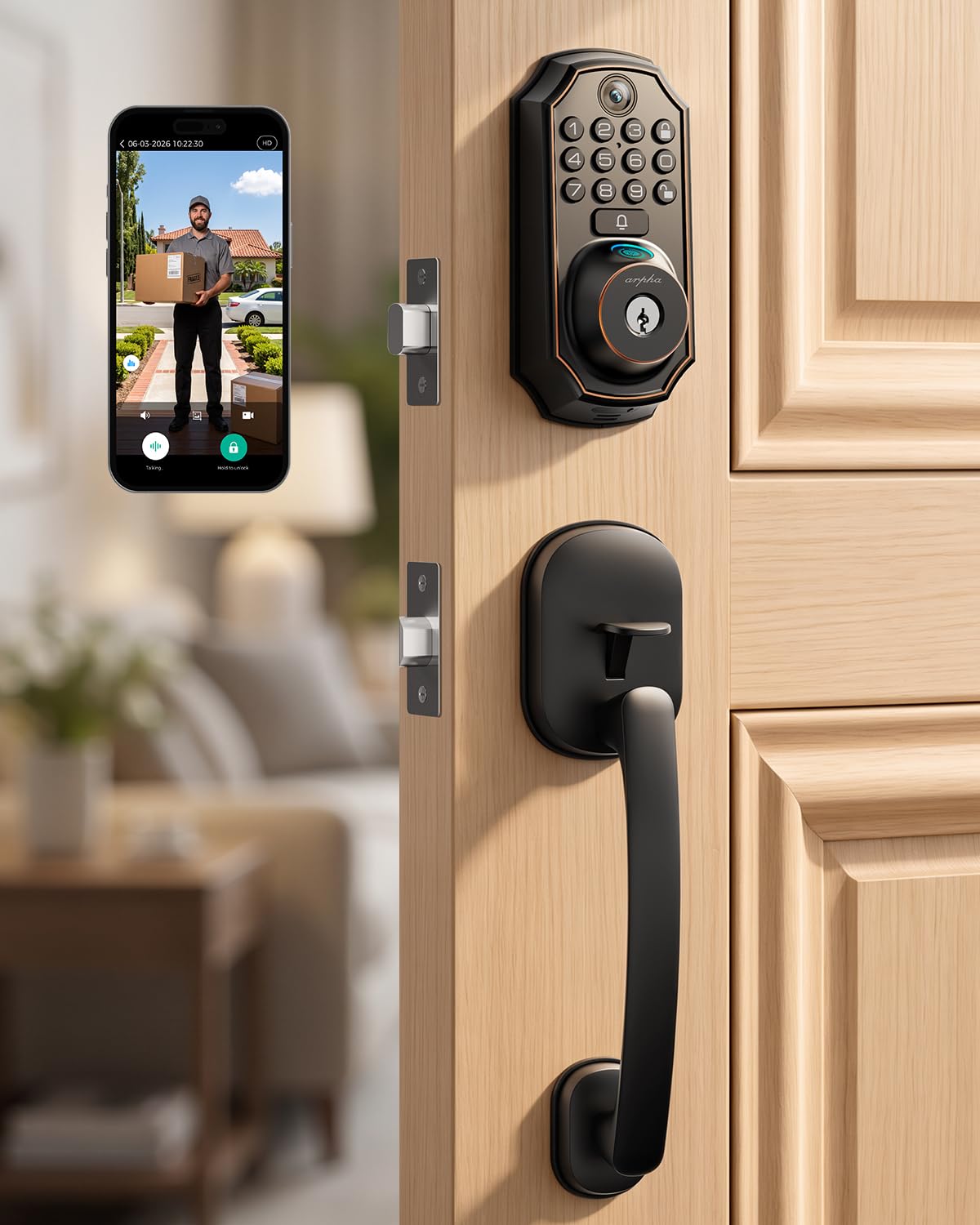
Type: Video smart lock with handle
Unlock Methods: Fingerprint, keypad, app
Camera Feature: Live 2-way video talk
Voice Control: Alexa and Google
Key Feature: Auto-lock timer
Price Tier: Premium
This is the only pick with a camera, and that changes what a carer arrangement can look like. Live 2-way video talk lets a family member speak to whoever is at the door before unlocking it remotely, which is useful when a new carer arrives or a delivery needs to be let in. The fingerprint and keypad routes keep everyday entry quick, and the auto-lock timer can be set so the door never sits unlocked after a visit.
The 5-in-1 keyless design covers the main entry methods in one deadbolt, and Alexa and Google support means voice commands work if the household already uses a smart speaker. App remote unlock is the feature that earns the premium: a family member can verify a visitor on video and open the door in the same session. For households managing a rota of carers, that visibility is worth more than another unlock method.
Who It Suits: Families who want to see and speak to a carer at the door before granting access.
Trade-off: The camera and video features add complexity and setup steps that a simple keypad lock does not require.
4. Veise VE06-H Smart Front Door Lock Handle Set (B0CNRLZWSG)

Type: Keyless entry deadbolt with handle set
Unlock Methods: Fob, app
Key Feature: Remote access sharing and user management
Weather Rating: IP55 waterproof
Finish: Matte black
Price Tier: Budget
The fob unlock is the standout here. A carer who does not want to remember a code or use a phone app can carry a small fob and open the door with a press, which suits older carers or anyone who finds touchscreens fiddly. Remote access sharing lets the household grant and revoke access through the app, and user management keeps track of who has which credential.
IP55 waterproofing means the lock is built to handle rain and splashes on an exposed front door, and the matte black finish gives it a modern look that hides smudges. Auto-lock secures the door after entry, and the low battery alarm gives warning before the lock stops working. This is the value pick for households that want fob-based access without paying for a camera or a touchscreen.
Who It Suits: Households where the carer prefers a physical fob over codes or apps.
Trade-off: The fob-based approach means no fingerprint reader and no video, so access is only as flexible as the fobs and app allow.
5. Philips Upgraded Wi-Fi Smart Lock with Handle (B0GZNFRZ6D)

Type: Keypad deadbolt with lever
Unlock Methods: Fingerprint, keypad, app
Connectivity: WiFi
Key Feature: App remote control and auto-lock
Intended Use: Bedrooms, office, front door
Price Tier: Budget
This lock is the most flexible on placement because the name lists bedrooms and offices alongside the front door. In a carer household that matters: an interior door to the cared-for person’s room can be fitted with the same lock, giving the carer fingerprint or keypad access without a key ring. Fingerprint unlock is quick for repeat visits, and the keypad covers anyone whose fingerprint will not read cleanly.
App remote control and auto-lock work the same way as on the pricier picks, so the core access features are all present at the lower price. The lever handle is familiar to operate and suits standard doors. Households that want smart access on more than one door without buying premium hardware twice will find this the sensible second or third unit.
Who It Suits: Households adding smart access to interior doors as well as the front door.
Trade-off: The lower price tier usually means a simpler build and fewer unlock routes than the premium picks, so it is best treated as a supporting lock rather than the sole front-door device in a high-traffic home.
Before You Buy
- Unlock method: Match the lock to how the carer actually wants to enter — fingerprint for speed, keypad for shared codes, fob for simplicity, app for family oversight.
- Connectivity: Built-in WiFi avoids a separate hub, but confirm the lock’s app supports remote sharing before relying on it for carer access.
- Door fit: Handle-and-deadbolt sets replace existing hardware, so measure the door thickness and backset before ordering.
- Number of doors: A set with two handles or a lock rated for interior doors covers a second entry point without a second purchase.
- Weather exposure: An exposed front door needs a weather-rated lock; IP55 is the rating to look for on this list.
- Power and warnings: A low battery alarm matters more in a carer household, because a dead lock strands the person being cared for.
- Access management: Check that codes, fobs and app users can be revoked individually when a carer arrangement changes.
Frequently Asked Questions
-
What is the best smart lock for a household with a carer?
The Philips WiFi Keypad Deadbolt with Handle is the strongest all-round pick because it combines code, fingerprint, voice and app access with auto-lock in one unit. -
Can a carer get in without a key?
Yes. Every lock on this list supports at least one keyless method, and most offer codes, fingerprints or fobs so the carer never needs a physical key. -
Can family members unlock the door remotely?
All five picks include app remote control or remote access sharing, so a family member can open the door for a carer from elsewhere. -
Which pick is best if the carer prefers something simple?
The Veise VE06-H is the easiest for a carer who wants a single press, because the fob removes the need to remember a code or use a phone. -
Is a video lock worth it for carer access?
The WiFi Video Smart Lock earns its premium when the household wants to see and speak to whoever is at the door before unlocking it remotely. -
Can these locks be fitted to interior doors?
The Philips Upgraded Wi-Fi Smart Lock is explicitly listed for bedrooms and offices, making it the natural choice for an interior door.
Bottom Line
For most households with a carer, the Philips WiFi Keypad Deadbolt with Handle is the best smart lock for a household with a carer: it covers code, fingerprint, voice and app access, adds auto-lock, and needs no separate hub. Households with two doors should look at the two-handle Philips set, and anyone who wants to see the carer at the door before unlocking should step up to the video model. Check current prices on Amazon before deciding.
