Why there are Amazon links here: Brave Review is paid a commission for qualifying Amazon purchases made through the links below. Your price does not change, and using our links is entirely optional. How this works
Kwikset Halo Wi-Fi Smart Lock: Keyless Entry Without the Hub
The Kwikset Halo Wi-Fi Smart Lock is a front-door deadbolt that connects straight to a home Wi-Fi network, so keyless entry and app control work without a separate hub or bridge. It suits homeowners who want to hand out codes to family, guests or a dog walker and stop worrying about spare keys under the mat. This review covers what the lock is built from, how the no-hub setup actually works, where it fits in a smart home, and the drawbacks worth knowing before buying. The short version: it is a strong pick for a single front door that needs remote access, and a weaker one for anyone already deep in a competing smart-home ecosystem.
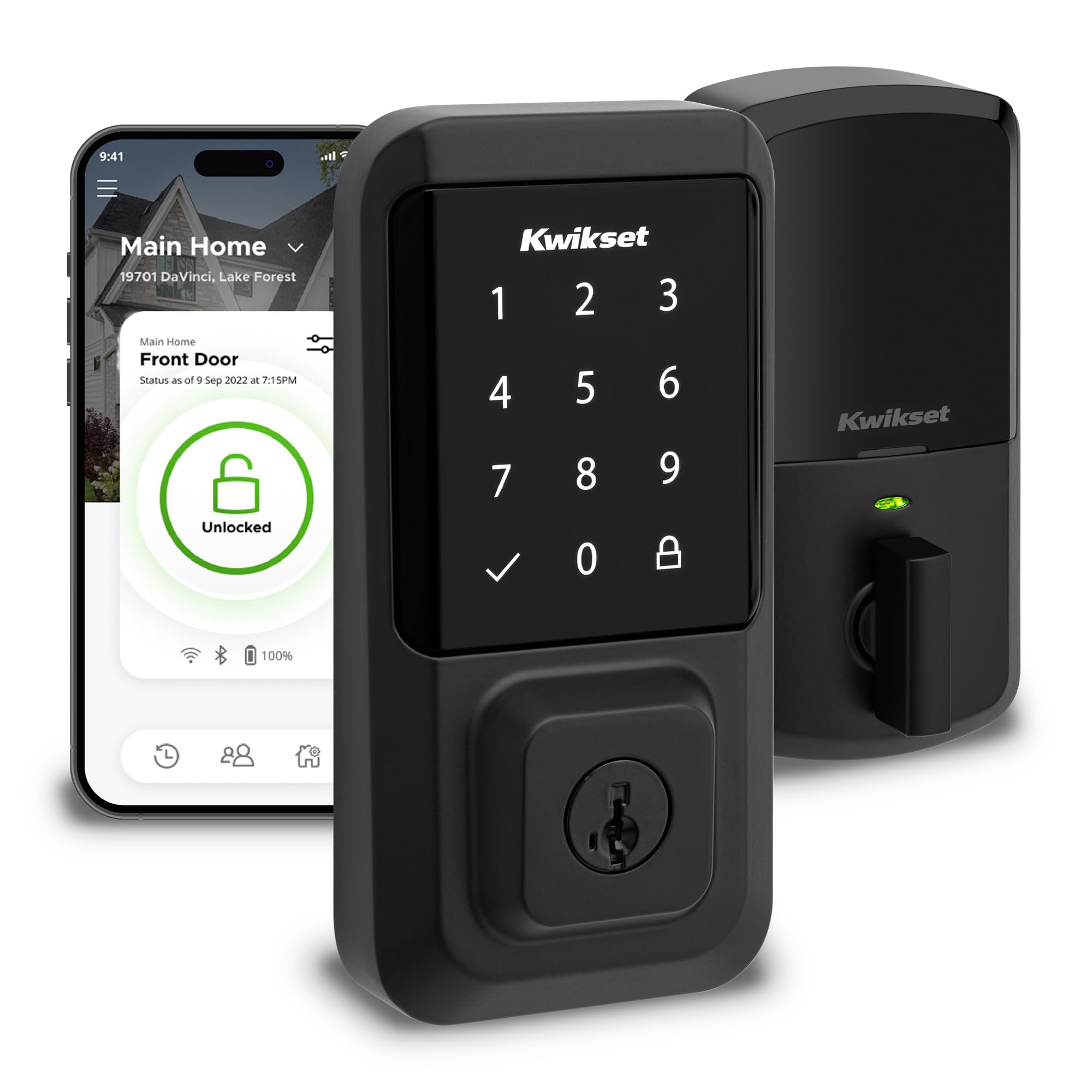
Features and Specifications
Product: Kwikset Halo Wi-Fi Smart Lock
Type: Keyless entry front door touchscreen deadbolt
Finish: Matte black
Connectivity: Wi-Fi, no hub required
Control: Smartphone app
Certifications: Grade AAA certified, UL listed
Installation: Easy install, replaces a standard deadbolt
The headline feature is the built-in Wi-Fi radio. Most smart deadbolts at this level talk to a hub or a plug-in bridge before they reach the internet, which adds a box, a power outlet and one more thing to troubleshoot. The Halo skips all of that: it joins the home network directly, and the phone app becomes the remote control. For a buyer who wants one lock on one door and nothing else, that is the whole appeal.
The second feature is the touchscreen keypad, which replaces the key cylinder on the outside. Codes are entered on a backlit touch surface rather than a physical keypad, and the matte black finish is aimed at modern door hardware rather than the brushed nickel look that dominates older deadbolts. The Grade AAA and UL listings speak to the lock’s mechanical and electrical build, which matters on an exterior door that has to survive weather, forced entry attempts and years of daily use.
Build and Materials
The Halo is a full-size deadbolt, not a slim retrofit that caps an existing lock. That means it replaces the deadbolt already in the door, reusing the same bore holes in most cases, and it brings the weight and solidity buyers expect from a Grade AAA cylinder. The matte black finish is a powder-style coating over metal, and it is the sort of surface that hides fingerprints better than polished brass or chrome — a practical detail on a touchscreen that gets handled constantly.
Because the keypad is glass-topped and capacitive, there is no keyway on the exterior side. That is the point of a keyless lock, but it also means the lock’s physical security rests entirely on the deadbolt and the electronics, with no mechanical override on the outside. Kwikset builds a physical key override into the interior side of this type of lock, so a dead battery does not trap anyone inside the house.
Trade-off: The touchscreen is the only way in from outside, so a cracked or unresponsive glass panel takes the whole entry method with it — a mechanical keypad or a keyed backup on the exterior would be more forgiving.
Power and Connectivity
The lock runs on batteries, which is standard for a deadbolt that cannot be wired to door power. Wi-Fi radios draw more current than the low-energy protocols hubs use, so buyers should expect to replace batteries more often than they would with a hub-based lock, and the app is the place to watch the remaining charge. A low-battery warning well before failure is the feature that makes or breaks this category, and it is worth checking that the alert is enabled on day one.
The no-hub design is the real selling point here. Setup is a matter of joining the lock to the home’s 2.4 GHz Wi-Fi network through the app, and from there codes can be created, scheduled and revoked remotely. That remote revocation is the quiet benefit of a Wi-Fi lock: a contractor’s code can be deleted the moment the job ends, without anyone driving back to the house.
The catch is range and network quality. A Wi-Fi lock at the front door depends on a signal that reaches that door, and a weak spot at the entryway shows up as slow app responses or missed commands. Homes with a router at the back of the house should plan on a mesh node or extender near the front before blaming the lock.
App Control and Daily Use
The app is the control surface for everything: locking and unlocking remotely, managing codes, reviewing activity and adjusting settings. For daily use, the touchscreen is the part that matters most — waking it, entering a code, and hearing the bolt retract. A four-to-eight digit code is quick once muscle memory sets in, and one-time codes for guests or delivery access are the feature most buyers end up using more than they expect.
Auto-lock is the other setting that changes how the lock feels in practice. A door that relocks itself after a set delay removes the late-night "did I lock it?" check, and remote locking from the app covers the rest. Buyers who want voice control should check compatibility carefully: the Halo’s native control is the app, and integration with assistants varies by model and region, so it is worth confirming before assuming a smart speaker will run the door.
Trade-off: The lock is at its best as a standalone app-controlled deadbolt, and buyers who have standardized their home on one voice assistant or automation platform may find the integration shallower than a hub-based lock built for that ecosystem.
Installation and Maintenance
Installation is a screwdriver job on a standard deadbolt bore, and Kwikset designs this class of lock for a direct swap rather than a carpentry project. The parts that trip people up are the ones common to all smart deadbolts: aligning the bolt with the strike plate so the door does not need a shoulder to close, and making sure the interior and exterior halves clamp squarely so the touchscreen sits flush.
Maintenance is mostly batteries and cleaning. The glass touchscreen picks up smudges, and a microfiber cloth is enough; abrasive cleaners can cloud the surface. The finish should be wiped rather than scrubbed to keep the matte coating intact. Beyond that, the lock wants a Wi-Fi network that stays up — a router reboot is the first thing to try if the app stops responding.
Trade-off: A Wi-Fi deadbolt adds a network dependency to a front door, so an internet outage means app control is gone until the connection returns, even though the keypad keeps working.
Who It Suits and Who It Does Not
The Halo fits the homeowner with one front door, a decent Wi-Fi signal at the entry, and a preference for simple over clever. Renters who cannot replace a deadbolt, households that need a keyed lock for building management, and buyers already committed to a hub-based smart-home platform should look elsewhere or confirm compatibility first. Anyone who wants a lock that works identically with or without the internet will find the app-first design a compromise.
FAQ
-
Does the Kwikset Halo need a hub?
No. The lock connects directly to a home Wi-Fi network, so the phone app is the only other piece of hardware required. -
Can the Kwikset Halo be used without Wi-Fi?
The touchscreen keypad and the deadbolt work without a network, but app control, remote unlocking and code management all depend on the Wi-Fi connection. -
Does the Kwikset Halo work with Alexa or Google Assistant?
Native control is through the Kwikset app. Voice assistant support varies, so buyers should confirm the current compatibility for their region before relying on it. -
What happens when the batteries die?
The lock gives a low-battery warning through the app, and there is a keyed override on the interior side so the door can still be opened from inside the house. -
Can the Kwikset Halo be installed on any door?
It is designed to replace a standard deadbolt on a prepared door. Doors without an existing deadbolt bore, or with unusual thickness, need extra prep or a different model. -
Is the Kwikset Halo weatherproof?
It is built as an exterior deadbolt with UL listing, so it is intended for outdoor doors. Extreme heat, direct sun and salt air still shorten the life of any electronic lock, and shade helps. -
Can codes be created for guests and deleted later?
Yes. The app manages codes, including temporary ones, and remote deletion is the main reason buyers choose a Wi-Fi lock over a keypad-only model. -
Does the matte black finish show fingerprints?
Less than polished metal, but the glass touchscreen still collects smudges. A quick wipe keeps it looking clean. -
Will the lock work if the internet goes down?
The keypad keeps working, but remote app control stops until the connection returns. The lock does not need the cloud to open the door with a code. -
Is a smart lock worth it for a single door?
For a front door that needs guest access, contractor codes or remote locking, yes. For a door that is rarely used, a standard deadbolt does the same job for less.
Bottom Line
The Kwikset Halo Wi-Fi Smart Lock is the right answer for a homeowner who wants keyless entry on one front door without buying into a hub, a bridge or a platform. The touchscreen, the direct Wi-Fi connection and the app-based code management cover the jobs most buyers actually have, and the Grade AAA build means the hardware is not the weak link. Buyers should go in knowing the trade-offs: the touchscreen is the only exterior entry method, the lock leans on a reliable Wi-Fi signal at the door, and it is a standalone device rather than a deep smart-home citizen. For the buyer those limits do not touch, it is a clean, simple upgrade to the most-used door in the house.
