Why there are Amazon links here: Brave Review is paid a commission for qualifying Amazon purchases made through the links below. Your price does not change, and using our links is entirely optional. How this works
Lockly Visage Zeno Series Smart Lock: Face Unlock for a Hands-Free Entry
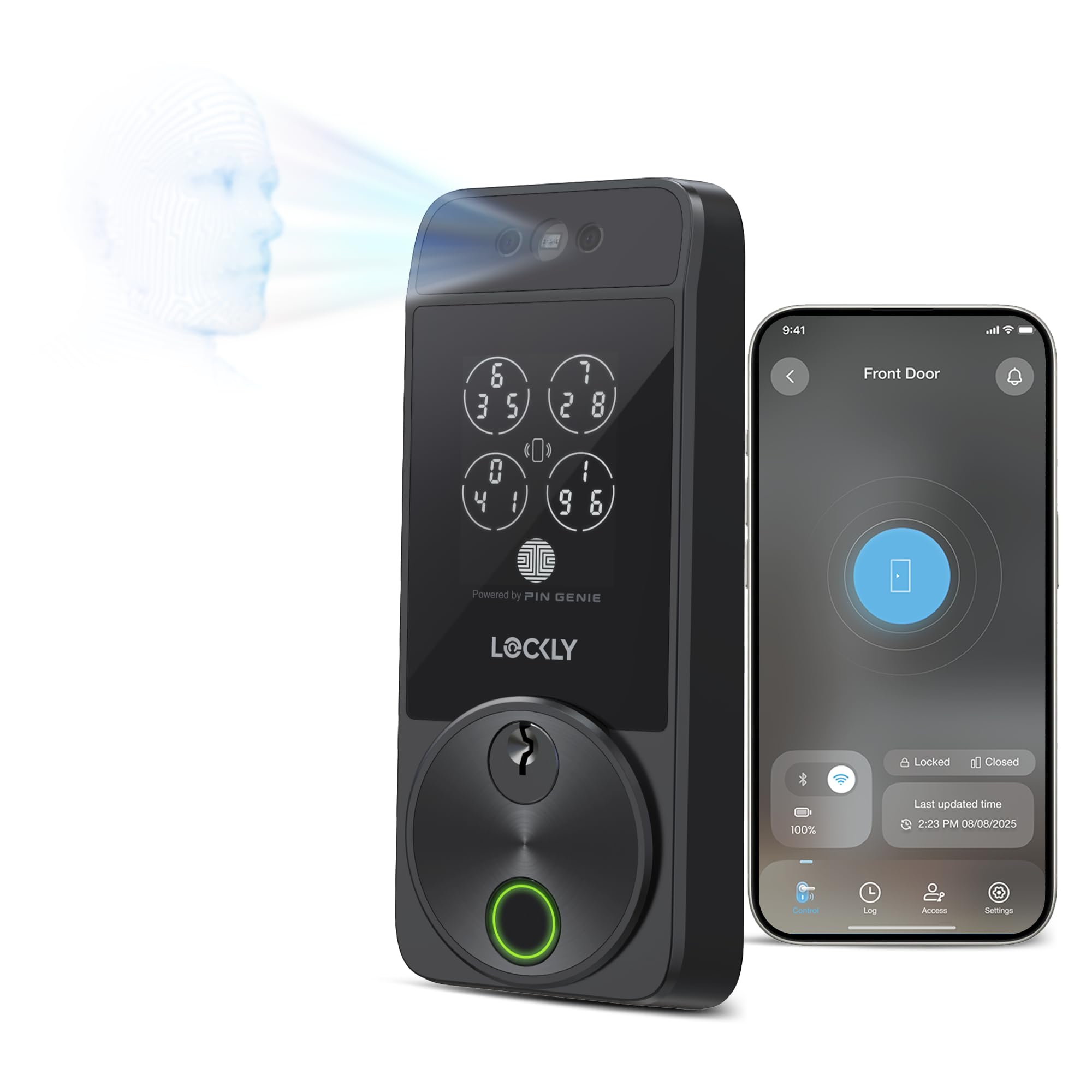
The Lockly Visage Zeno Series smart lock is a premium deadbolt built for buyers who want to walk up to the front door and have it open without reaching for a key, a phone, or a keypad. It combines facial recognition, a fingerprint reader, the PIN Genie keypad, app control, and Apple Home Key support in one unit. This review covers what the lock is built to do, where its price tier shows, and which households get real value from it. Buyers ready to compare it against a standard keypad deadbolt can jump straight to the check-price link.
Features and Specifications
Product: LocklyKeyless Entry Door Lock for Front Door, Visage Zeno Smart Lock
Type: Keyless entry deadbolt for front doors
Entry Methods: Facial recognition, fingerprint, PIN Genie keypad, app control, Apple Home Key
Smart Home: Works with Apple Home Key, Alexa, and Google
Installation: Easy install, standard deadbolt replacement
Best For: Hands-free entry and households with multiple regular visitors
The core draw here is the number of ways in. Facial recognition handles the walk-up entry, the fingerprint sensor covers a quick touch, and the PIN Genie keypad gives a fallback that does not depend on a phone or a face being recognized. Apple Home Key support means an iPhone or Apple Watch can act as the credential, and the app handles remote control and guest access.
Alexa and Google compatibility extend the lock into a broader smart home setup, so entry events and status can be part of routines rather than a standalone system. For buyers already invested in one of those ecosystems, that integration is often the deciding factor over a plain keypad lock.
The "easy install" claim matters at this price. A deadbolt replacement that fits standard door prep keeps the project within reach of a confident DIYer, though anyone with an unusual door or a metal frame should expect more work. The lock is a full deadbolt assembly, not a retrofit cover for an existing lock.
Trade-off: Facial recognition and multi-method entry push this lock into premium pricing, and buyers who only need a keypad code are paying for capability they may never use.
Check the current price on Amazon
Build and Hardware
The Visage Zeno is a deadbolt first. That means a metal bolt thrown into the door frame, which is the security baseline any smart lock has to meet before the electronics matter. The exterior assembly carries the camera and sensor hardware for facial recognition alongside the keypad and fingerprint reader, so the faceplate is busier and thicker than a simple code lock.
Buyers should think about door thickness and prep before ordering. Deadbolt replacements generally assume standard bore holes, and a lock with this much hardware on the exterior benefits from a solid door that will not flex. A hollow or thin door is a poor match for any premium deadbolt, this one included.
The PIN Genie keypad is the practical backstop. It shuffles the digit layout so a bystander cannot learn a code from finger position, which is a meaningful detail for a front door that faces a street or hallway. The fingerprint reader adds speed for the people who live there, while the keypad serves guests and anyone whose print will not read cleanly.
Power and battery access are part of the ownership picture. A lock with a camera, a fingerprint sensor, and wireless radios draws more current than a keypad-only model, so battery changes come around more often. Buyers should plan on keeping a physical key or a backup entry method available and know where the emergency power point sits before the first low-battery warning.
Entry Methods and Daily Use
Facial recognition is the headline feature and the one that changes behavior. Instead of digging for a key with full hands, a buyer walks up and the lock reads the face and releases the bolt. That is genuinely useful for grocery runs, dog walks, and anyone carrying children or tools. It is also the feature most dependent on conditions: strong backlight, low light, hats, and sunglasses all affect how reliably a camera-based system recognizes a face.
Fingerprint entry covers the everyday case where a hand is free. It is faster than typing a code and does not require a phone. The limitation is the same one every fingerprint reader carries — wet, cold, or worn fingertips read poorly, so the keypad stays relevant.
Apple Home Key is the quiet winner for iPhone households. Tapping a phone or watch to the lock is fast, familiar, and does not require opening an app. For buyers outside Apple’s ecosystem, that particular feature adds nothing, and the value shifts to the keypad, fingerprint, and app instead.
The app layer handles the administrative side: adding and removing codes, checking status, and managing access for guests, cleaners, or dog walkers. Remote control depends on the lock being connected to the home network through the appropriate hub or bridge for the chosen ecosystem, which is a setup step buyers should confirm before purchase.
Smart Home Integration
Alexa and Google support let the lock participate in voice routines and status checks. A buyer can ask whether the door is locked or include the lock in a departure routine, which is the kind of small convenience that justifies a smart lock over a mechanical deadbolt. The depth of that integration depends on the platform and any required bridge.
Apple Home Key sits inside Apple’s home framework, so households already using Apple’s home app get the tightest experience. Mixing ecosystems is possible but rarely elegant; buyers should pick the platform the household actually uses and treat the others as bonuses.
The practical caution is network dependency. Features that rely on the app or a voice assistant stop working if the network or bridge goes down, which is why the keypad and a physical key remain important. A smart lock should never be the only way into a house.
Installation and Maintenance
Installation is a standard deadbolt swap in most cases: remove the old lock, fit the new exterior and interior assemblies, and connect the electronics. Buyers comfortable with a screwdriver and a drill can usually handle it; anyone unsure should budget for a locksmith, which adds to the real cost of ownership.
Maintenance is mostly batteries and software. Battery life on a lock with a camera and multiple radios will be shorter than on a simple keypad model, so keeping spare batteries on hand is sensible. App and firmware updates matter too, since features and fixes arrive that way.
The lock’s exterior hardware needs occasional cleaning, particularly the camera window and fingerprint sensor, because smudges and dust degrade recognition. That is a minute of upkeep every so often, not a burden, but it is part of owning a sensor-heavy lock.
Trade-off: The feature set demands more battery attention and network setup than a basic deadbolt, so buyers who want zero maintenance should look at a simpler keypad lock.
Who It Suits and Who It Does Not
The Visage Zeno fits households that want hands-free entry as a daily habit, especially those with children, pets, or frequent comings and goings with full arms. Apple households get the most from it thanks to Home Key, and anyone managing regular visitors will appreciate the app-based access control.
It does not suit buyers on a tight budget, renters who cannot change the deadbolt, or anyone who only needs a code for the family. Those buyers are better served by a mid-range keypad lock and will save a meaningful amount. A household with an unreliable network or no interest in app management should also think twice, since much of the premium is tied to connected features.
Buyers with unusual doors, metal frames, or non-standard prep should confirm fit before ordering. The lock rewards a standard front door and a household that will actually use facial recognition and phone tap entry.
FAQ
-
What is the Lockly Visage Zeno Series smart lock?
It is a keyless entry deadbolt for front doors with facial recognition, a fingerprint reader, the PIN Genie keypad, app control, Apple Home Key support, and Alexa and Google compatibility. -
Does the Lockly Visage Zeno work with Apple Home Key?
Yes. The lock supports Apple Home Key, so an iPhone or Apple Watch can be used as the entry credential in addition to face, fingerprint, and code. -
Can this lock be used without a phone?
Yes. Facial recognition, the fingerprint reader, and the PIN Genie keypad all work without a phone, which makes it usable for guests and for anyone who prefers not to carry a device to the door. -
Is the Lockly Visage Zeno hard to install?
It is designed as an easy-install deadbolt replacement for standard door prep. Buyers with standard doors can usually handle it; unusual doors or metal frames may need professional help. -
Does it work with Alexa and Google?
Yes, the lock supports both Alexa and Google in addition to Apple Home Key, though the depth of integration depends on the platform and any required bridge. -
What happens if the battery dies?
A backup entry method and an emergency power option are part of the design, so buyers should keep a physical key accessible and know the backup point before the first low-battery warning. -
Is facial recognition reliable in the dark?
Camera-based recognition is affected by lighting, backlight, hats, and sunglasses. The fingerprint reader and keypad exist precisely so there is always a fallback. -
Who should not buy this lock?
Renters, budget-focused buyers, and households that only need a simple code are overpaying here. A mid-range keypad deadbolt covers those needs for less. -
Does it replace the existing deadbolt?
Yes, it is a full deadbolt assembly rather than a cover for an existing lock, so the old hardware comes off during installation. -
Is a smart lock like this secure?
The deadbolt construction provides the physical security baseline, and the PIN Genie keypad obscures code entry. As with any connected lock, keeping firmware updated and using the app’s access controls matters.
Bottom Line
The Lockly Visage Zeno Series smart lock is the right buy for a household that wants to walk up and get in without a key, especially one already inside Apple’s ecosystem. Facial recognition, fingerprint, PIN Genie, app control, and Home Key together cover almost every entry scenario, and the deadbolt build keeps the security fundamentals intact. Buyers who only need a code, renters, and the budget-conscious should skip it and put the savings toward a simpler lock.