Why there are Amazon links here: Brave Review is paid a commission for qualifying Amazon purchases made through the links below. Your price does not change, and using our links is entirely optional. How this works
Tapo P110M Review: Smart Plug With Real Energy Monitoring
The Tapo P110M is a two-pack of Wi-Fi smart plugs aimed at buyers who want to switch appliances on and off by voice or app and actually see what those appliances cost to run. It works with Alexa, Google Home and Samsung SmartThings, supports Matter, and monitors energy use. This review covers what the plug does, how the hardware is likely to behave, where the two-pack format helps and where it gets in the way, and who should skip it. The short answer: it suits households already living inside a smart-home ecosystem that want per-appliance energy data without paying per-plug premium prices.
Features and Specifications
Type: Wi-Fi smart plug, two-pack
Voice and platform support: Alexa, Google Home, Samsung SmartThings
Protocol: Matter compatible
Energy monitoring: Yes
Wireless band: 2.4 GHz Wi-Fi only
Electrical rating: 15A
Certification: UL Certified
ASIN: B0DKGBP38V
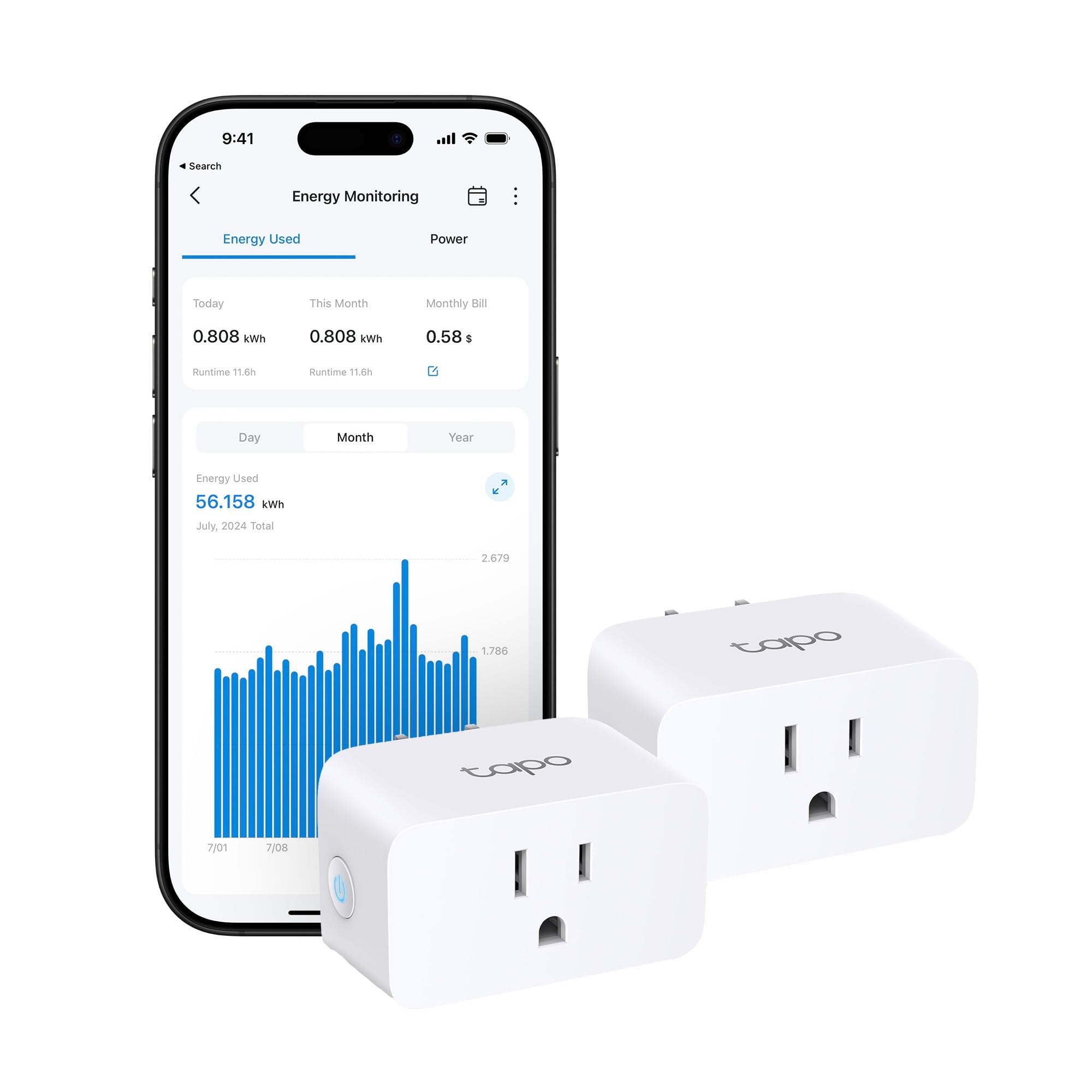
The specification list reads like a checklist of what a modern smart plug should offer, and the two items that matter most are Matter compatibility and energy monitoring. Matter means the plug can join a compatible smart-home hub or app rather than being locked to a single vendor’s ecosystem, which is the biggest practical difference between this and older budget plugs. Energy monitoring is the feature that separates the P110M from a plain on/off plug: it reports how much power a connected device draws, so a buyer can see what a space heater, dehumidifier or aging fridge actually costs to run.
The 15A rating is the number to check before buying. Fifteen amps covers most household appliances on a standard US circuit, including heaters, kettles and window air conditioners, but buyers should confirm the rating of the device they intend to control rather than assuming any plug will handle anything. The 2.4 GHz-only limitation is the other detail worth flagging early: many budget smart plugs skip the 5 GHz band, and it means the plug connects to the slower, longer-range network rather than the fast one. That is fine for a plug sending small data packets, but it does mean the phone used for setup needs to be on the 2.4 GHz network during pairing.
Build, Size and the Two-Pack Format
The P110M is a compact plug designed to sit in a wall outlet without blocking the second socket, and the two-pack format is the practical heart of this listing. Two plugs in one box means a buyer can cover two appliances at once — say a space heater and a dehumidifier, or a TV and a game console — without buying twice. For anyone monitoring energy across a room rather than a single device, the pair is the more useful configuration.
The trade-off is that the two-pack forces a decision about where both plugs go. A buyer who only needs one monitored outlet ends up with a spare plug and a higher upfront cost than a single-plug purchase would carry. The plug body is the usual white plastic block, and like most smart plugs in this class it protrudes from the wall enough to matter behind furniture. Buyers planning to use one behind a sofa or a low-clearance shelf should check the clearance before committing.
The UL certification is worth noting for safety-conscious buyers. A plug that sits in a wall outlet and switches a high-draw appliance carries real electrical risk, and the UL mark indicates the unit has been tested to a recognized safety standard. That does not make any plug risk-free, but it is a meaningful signal in a category where cheap unlisted imports are common.
Trade-off: The two-pack format and 2.4 GHz-only radio make this a poor fit for buyers who need a single plug or run a 5 GHz-only home network.
Check the current price on Amazon
Power, Energy Monitoring and App Control
The 15A rating and the energy monitoring are the two features that justify this plug over a basic on/off model. A 15A plug can switch a genuinely power-hungry appliance, and the monitoring turns the plug into a diagnostic tool: a buyer can watch a device’s draw over a day and work out what it costs on the electricity bill. For anyone trying to find the appliance quietly inflating a utility bill, that data is the point.
Energy monitoring on a plug like this reads current draw at the outlet, so the accuracy depends on how the appliance behaves — a device with a standby mode and a high-power mode will show both, and the app is where the history lives. The plug reports rather than controls consumption; it cannot reduce a device’s draw, only switch it off. Buyers expecting the plug to optimize energy use on its own will be disappointed, because the value is in the information, not automatic savings.
App control and scheduling are where the smart-plug category earns its keep. The plug pairs with the Tapo app and the named platforms, so a buyer can put a heater on a schedule, switch a lamp by voice, or trigger a plug from a routine in Alexa or Google Home. Matter compatibility extends that to hubs that speak the standard, which future-proofs the purchase somewhat: the plug is not stranded if the household later changes platforms.
Maintenance, Setup and Day-to-Day Use
Setup on a plug like this runs through the vendor app and the 2.4 GHz network, and the main friction point is the band requirement. A phone connected to a 5 GHz network during pairing can fail to find the plug, and the fix is to switch the phone to the 2.4 GHz network or use the app’s pairing flow carefully. Buyers who have set up smart plugs before will recognize the pattern; first-timers should expect to spend a few minutes on it.
Day-to-day maintenance is minimal. The plug has no moving parts and no filters, so the work is keeping the app updated and making sure the plug is not overloaded. The one habit worth building is checking the plug’s rating against whatever gets plugged into it — a 15A plug is generous, but a buyer stacking a high-draw appliance onto an already-loaded circuit should think about the circuit, not just the plug. Heat buildup behind furniture is the other thing to watch, since any plug switching a heavy load warms up in use.
The monitoring feature needs a little patience to be useful. The value comes from leaving a plug in place for days and reading the history, not from a single glance at the app. Buyers who want instant answers about a device’s cost will get them, but buyers who want a full picture of a home’s energy use need more than two plugs and should treat this as a starting point rather than a whole-home monitor.
Who Should Buy the Tapo P110M
The Tapo P110M suits two overlapping groups. The first is the smart-home household already using Alexa, Google Home or SmartThings that wants to add two switchable, monitored outlets without buying into a new ecosystem. The second is the energy-curious buyer who wants to know what specific appliances cost to run and is willing to leave the plug in place long enough to find out. The Matter support and the two-pack price make it a sensible entry point for both.
It is not for buyers who need a single plug and nothing more, since the two-pack format charges for a spare. It is also a poor fit for a home network where the 2.4 GHz band is unavailable or unreliable, and for anyone who expects the plug to cut energy use automatically rather than simply report it. Buyers wanting whole-home energy monitoring should look at a panel-level monitor instead, because two plugs cannot cover a house.
FAQ
-
What is the Tapo P110M?
It is a two-pack of Wi-Fi smart plugs with energy monitoring, Matter compatibility, and support for Alexa, Google Home and Samsung SmartThings, rated for 15A. -
Does the Tapo P110M work with Alexa and Google Home?
Yes. The listing names Alexa, Google Home and Samsung SmartThings as supported platforms, and Matter compatibility extends control to compatible hubs. -
Does the Tapo P110M monitor energy use?
Yes. Energy monitoring is a named feature, so the plug reports the power draw of whatever is connected to it through the app. -
Is the Tapo P110M 2.4 GHz only?
Yes. The listing specifies 2.4 GHz Wi-Fi only, so the plug will not connect to a 5 GHz network. -
What does the 15A rating mean?
It is the plug’s electrical current rating. Fifteen amps covers most household appliances, but buyers should confirm the rating of the device they plan to control. -
Is the Tapo P110M UL certified?
Yes. UL Certified is listed among the product’s features, which is a meaningful safety signal for a plug switching high-draw appliances. -
How many plugs come in the box?
Two. The listing is a 2-pack, so buyers get two plugs in a single purchase. -
Does the Tapo P110M need a hub?
No. It is a Wi-Fi plug that connects directly to the home network and the app, and Matter compatibility lets it work with compatible hubs rather than requiring one. -
Can the Tapo P110M be used with a space heater?
The 15A rating covers many heaters, but the heater’s own rating must be checked against the plug’s limit before use, and high-draw appliances deserve extra care with clearance and circuit load. -
Who is the Tapo P110M not for?
Buyers who need only one plug, homes without a usable 2.4 GHz network, and anyone expecting automatic energy savings rather than reported data.
Bottom Line
The Tapo P110M is a sensible buy for households already inside Alexa, Google Home or SmartThings that want two monitored, switchable outlets without paying a premium per plug. Matter support, UL certification and the 15A rating cover the practical bases, and the two-pack makes the energy monitoring genuinely useful across more than one appliance. The cautions are real but narrow: 2.4 GHz-only networking, a spare plug for single-outlet buyers, and monitoring that informs rather than saves. Buyers in the target group should check the current price on Amazon before deciding.
