Why there are Amazon links here: Brave Review is paid a commission for qualifying Amazon purchases made through the links below. Your price does not change, and using our links is entirely optional. How this works
Best UPS for a Hub and Router to Keep Wi-Fi Alive in an Outage
A UPS for a hub and router keeps the internet connection alive when the power drops, so the household stays online for calls, work and smart-home gear. The picks below cover three buyer profiles: the budget buyer who only needs to ride out short outages, the compact-space buyer with a shelf or cabinet install, and the whole-desk buyer who wants one unit to protect a router, hub, modem and computer together. The overview table below lines up every pick by key spec, best use and price tier, and each review follows with the details that decide the choice.
Overview of the Picks
| Product | Key Spec | Best Use | Price Tier |
|---|---|---|---|
| APC BE600M1 | 600VA/330W, USB charging, 490 J surge protection | Routers, hubs and NAS on a budget | Budget |
| CyberPower ST425 | 425VA/260W, 8 outlets, compact | Small hubs and modems on a shelf | Budget |
| APC BE425M | 425VA/255W, mini form, quick-mute alarms | Wi-Fi routers and modems in tight spots | Budget |
| CyberPower CP1500PFCLCD | 1500VA/1000W, 12 outlets, AVR, sinewave | Router plus desktop and NAS | Premium |
| APC BX1500M | 1500VA/900W, 10 outlets, AVR, 789 J | Long runtime for a full network stack | Premium |
APC BE600M1 UPS Battery Backup & Surge Protector

Capacity: 600VA / 330W
Runtime: 23 minutes at 100W
Surge Protection: 490 joules
Charging: USB charging port
Type: Standby UPS for computer, router and NAS
APC BE600M1 UPS Battery Backup & Surge Protector
This is the middle of the small-UPS bracket, and the extra capacity over the 425VA units is the reason it earns a spot. The 600VA/330W rating and the 23-minute runtime at 100W mean a router, a hub and a modem can sit out a short outage without the connection dropping. The USB charging port is a practical extra for a phone on the same shelf, and the 490-joule surge rating covers the everyday spikes that kill networking gear. It suits a home office or apartment where the network stack lives in one place.
The pick is aimed at buyers who want one box to protect the router, hub and a NAS without spending premium money. The caution is capacity: this is still a standby-class unit, so a full desktop PC plus networking gear will drain it quickly, and the runtime figure assumes a light load.
Trade-off: The 330W ceiling limits it to networking gear and light electronics, so it is not the unit for a gaming rig or a large NAS.
CyberPower ST425 Standby UPS Battery Backup and Surge Protector

Capacity: 425VA / 260W
Outlets: 8
Form Factor: Compact
Certification: UL Certified
Type: Standby UPS and surge protector
CyberPower ST425 Standby UPS Battery Backup and Surge Protector
The ST425 is the outlet-count pick of the small units. Eight outlets let a buyer run a modem, router, hub, switch and a couple of chargers from one compact block, which matters when the network gear is spread across a shelf. The 425VA/260W rating is sized for that light load, and the UL certification is the safety baseline buyers should expect at this tier. The compact body fits behind furniture or inside a cabinet where a tower unit will not go.
It suits renters and small-apartment buyers who need surge protection plus a few minutes of backup rather than long runtime. The caution is the capacity: 260W leaves little headroom, so plugging in a monitor or a desktop alongside the network gear shortens the backup window sharply.
Trade-off: The 260W output is the lowest here, so the unit is best kept to networking gear and small electronics.
APC BE425M UPS Battery Backup and Surge Protector for Small Electronics

Capacity: 425VA / 255W
Surge Protection: Computer-grade
Alarms: Quick-mute
Certification: UL Certified
Type: Mini UPS for Wi-Fi routers and modems
APC BE425M UPS Battery Backup and Surge Protector for Small Electronics
This is the smallest unit in the roundup and the one built most clearly for a router and modem pair. The 425VA/255W rating and the mini body suit a wall outlet or a narrow shelf, and the quick-mute alarms are a real quality-of-life feature in a bedroom or a shared living space where a beeping UPS at 2 a.m. is unwelcome. Computer-grade surge protection is the same class of protection the larger units carry, so the router is not getting a lesser safeguard.
It suits buyers whose only goal is keeping Wi-Fi and the hub alive through short outages, especially in a small home. The caution is the same as any 425VA unit: the backup window is short, and adding a switch or a NAS to the load cuts it further.
Trade-off: The 255W output and small battery mean short runtime, so it is a router-and-modem unit rather than a network-rack unit.
CyberPower CP1500PFCLCD PFC Sinewave UPS Battery Backup and Surge Protector

Capacity: 1500VA / 1000W
Outlets: 12
Power Quality: PFC sinewave, AVR
Form Factor: Mini tower
Certification: UL Certified
Type: UPS for computers, networking and electronics
CyberPower CP1500PFCLCD PFC Sinewave UPS Battery Backup and Surge Protector
The CP1500PFCLCD is the premium pick and the one that covers a whole desk, not just the router. The 1500VA/1000W rating and 12 outlets let a buyer run the hub, router, modem, a desktop with an active PFC power supply and a monitor from one tower. The sinewave output and AVR are the technical reasons it earns the price: active PFC power supplies need a clean sinewave to stay happy on battery, and AVR corrects brownouts without draining the battery. The mini-tower body sits on the floor or beside a desk.
It suits buyers running a home office or a small network closet where the router is only one of several things that must stay up. The caution is that the capacity is overkill for a router alone, and the tower takes up more floor space than the small units.
Trade-off: The price and footprint are the highest here, and a buyer protecting only a router is paying for capacity that will never be used.
APC BX1500M UPS Battery Backup & Surge Protector for Computers, Electronics
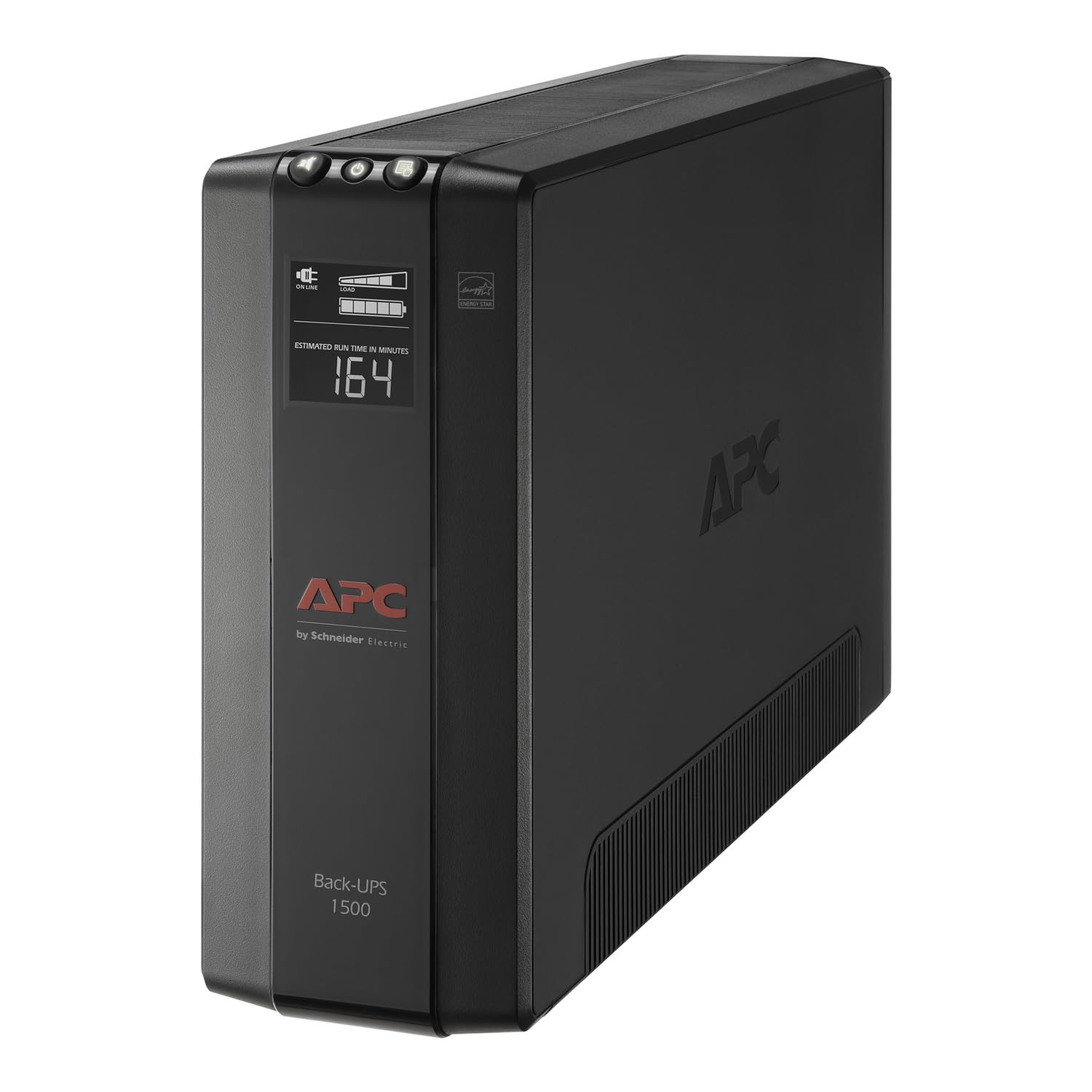
Capacity: 1500VA / 900W
Outlets: 10
Runtime: 68 minutes at 100W
Surge Protection: 789 joules, AVR
Certification: UL Certified
Type: UPS for computers and electronics
APC BX1500M UPS Battery Backup & Surge Protector for Computers, Electronics
The BX1500M is the runtime pick. The 68-minute runtime at 100W is the headline number and the reason it sits at the top of the capacity bracket for a network stack: a router, hub and modem draw well under that, so the backup window stretches longer than the small units can manage. The 1500VA/900W rating, 10 outlets, AVR and 789-joule surge rating round out a unit that protects the network gear and a desktop at the same time. UL certification is the safety baseline.
It suits buyers in areas with frequent or long outages who want the router and hub to stay online through a full evening, not just a flicker. The caution is that this is a stepped-approximation unit rather than a sinewave one, so a desktop with an active PFC supply is better served by the CyberPower above.
Trade-off: The output is stepped rather than pure sinewave, which makes it a better fit for networking gear than for sensitive PFC desktop supplies.
Before You Buy
- Capacity: Match the VA/W rating to the load. A router and modem draw very little, so a 425VA unit is enough; adding a NAS or desktop pushes the choice toward 600VA and up.
- Runtime: Runtime is quoted at a specific load, so a higher number at 100W means a longer window for light networking gear. Buyers who need hours of backup should size up.
- Outlet count: Count every plug the network stack needs — router, modem, hub, switch, chargers — and leave one spare. The 8- and 12-outlet units exist for a reason.
- Power quality: AVR protects against brownouts and sags, and sinewave output matters for desktops with active PFC supplies. Networking gear alone rarely needs sinewave.
- Form factor: Measure the shelf, cabinet or floor space first. Mini and compact units fit behind furniture; mini towers need floor or desk space.
- Certification: UL certification is the safety baseline for any UPS plugged in indoors, and every pick here carries it.
- Alarms: Quick-mute or muteable alarms matter in a bedroom or shared space where a UPS will beep during an outage.
Frequently Asked Questions
-
How long will a UPS keep a router and hub running?
It depends on the load and the unit. A small 425VA unit keeps a router and modem up for a short outage, while the 1500VA units with a 68-minute runtime at 100W stretch that window much further for light networking gear. -
Does a router need a pure sinewave UPS?
No. Routers and hubs are simple loads that run fine on a standby or stepped-approximation UPS. Sinewave output matters mainly for desktops with active PFC power supplies. -
Can a hub and router share one UPS?
Yes, and that is the usual setup. Both draw little power, so a single small unit covers them, and the outlet count is the main thing to check. -
Is AVR worth paying for on a router UPS?
AVR helps in areas with frequent brownouts and sags, correcting the voltage without switching to battery. Buyers with clean power can skip it; buyers with unstable power should not. -
Where should the UPS sit relative to the router?
Close enough for the router’s power adapter to reach, and with some airflow around the unit. A shelf, cabinet or floor spot beside the network gear works, as long as the unit is not buried under other equipment. -
Can a UPS be left plugged in all the time?
Yes. A UPS is designed to stay connected and charged, and it only switches to battery when the input power fails. The battery is the part that wears over time and eventually needs replacing.
Bottom Line
For most households, the APC BE600M1 is the best UPS for a hub and router: enough capacity to run the network stack through a short outage, a USB charging port for the same shelf, and a price that stays in the budget tier. Buyers with a whole desk to protect should step up to the CyberPower CP1500PFCLCD, and buyers who only need a few minutes of Wi-Fi should look at the compact APC BE425M.
